What Mira is
An organisation, its departments, the tables inside them, the sessions people make, and why every answer shows its source.
Overview
Mira lets everyone in your company ask questions of the company's data in plain English. You type a question the way you would ask a colleague. Mira looks the answer up in your organisation's tables and gives it back, with a chart, a dashboard or a written report if you want one. Every answer shows where it came from, so you can trust it and check it.
You do not need to know where the data lives or how it is arranged. Mira works that out.
Your organisation
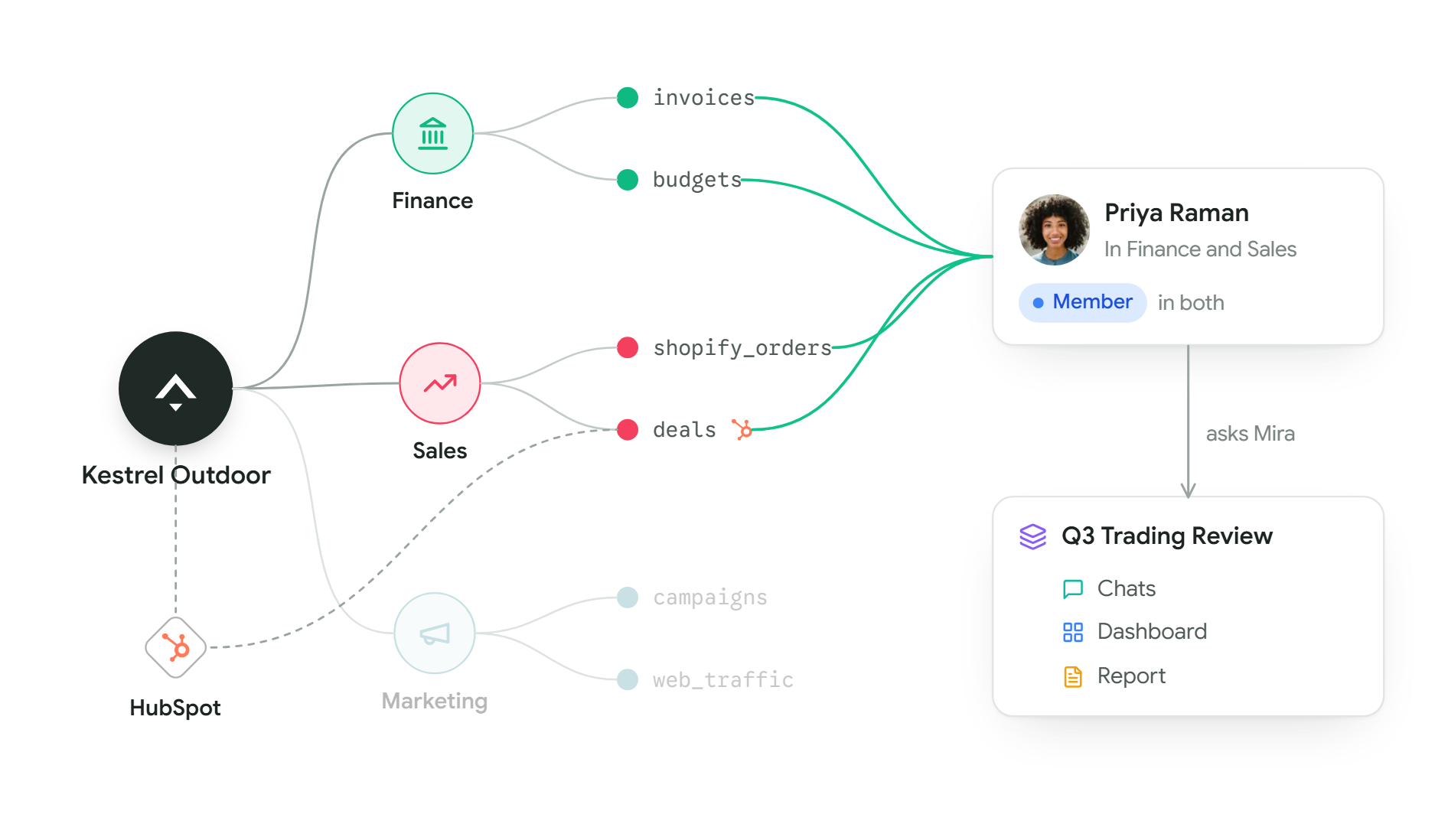
Your company is an organisation in Mira. Everything else sits inside it: the people, the departments and the data. At Kestrel Outdoor, the organisation is Kestrel Outdoor itself.
Each person has one of three levels in the organisation. The Owner set it up, Admins help run it, and everyone else is a User. Most people are Users, and that is all they need to ask questions. Members and access explains the three.
Departments
A department is a team, such as Finance, Sales or Marketing. It has people and it has data. What you can see in Mira follows the departments you belong to.
Priya is in Finance and Sales at Kestrel Outdoor. She can ask about Finance's tables and Sales' tables. She cannot see Marketing's, and does not need to. Each department has a Lead, who decides who is in it and which tables they see. How departments work has the detail.
Tables and connected systems
Mira answers from tables: rows and columns, like a spreadsheet. Tables arrive in two ways.
- You upload a file, such as a CSV or Excel sheet. See Uploading files.
- You connect a system your company already uses, such as HubSpot or Shopify. Mira keeps its tables up to date on its own. See Connecting a system.
A system can be connected once for the whole organisation and then shared with the departments that need it. Kestrel Outdoor connected HubSpot once and shared its tables with Sales. Mira only ever reads your data. It never changes anything in the systems you connect.
To see every table you can ask about, open The data catalogue. Where data comes from explains the rest.
Sessions
When you ask a question from the home screen, Mira opens a session. A session is one piece of work. It keeps the conversation and everything you make from it: the charts, one dashboard and any reports. Come back tomorrow and it opens where you left it. See Chats and sessions.
What you can do with Mira
| You can | For example | Read more |
|---|---|---|
| Ask a question | "How is gross margin tracking against the plan this quarter?" | Asking questions |
| Get a chart | "Chart web store revenue by month this year." | Building a dashboard |
| Build a dashboard | Your most important measures on one page, kept current. | Always current |
| Write a report | A written document of trends and findings, ready for Word. | Creating a report |
You can share a dashboard with named colleagues, or present it full screen in a meeting. See Sharing and presenting.
Why every answer shows where it came from
A number is only useful if you can trust it. So every answer from Mira carries the tables it used and the working behind each figure. Click a figure and you see where it came from.
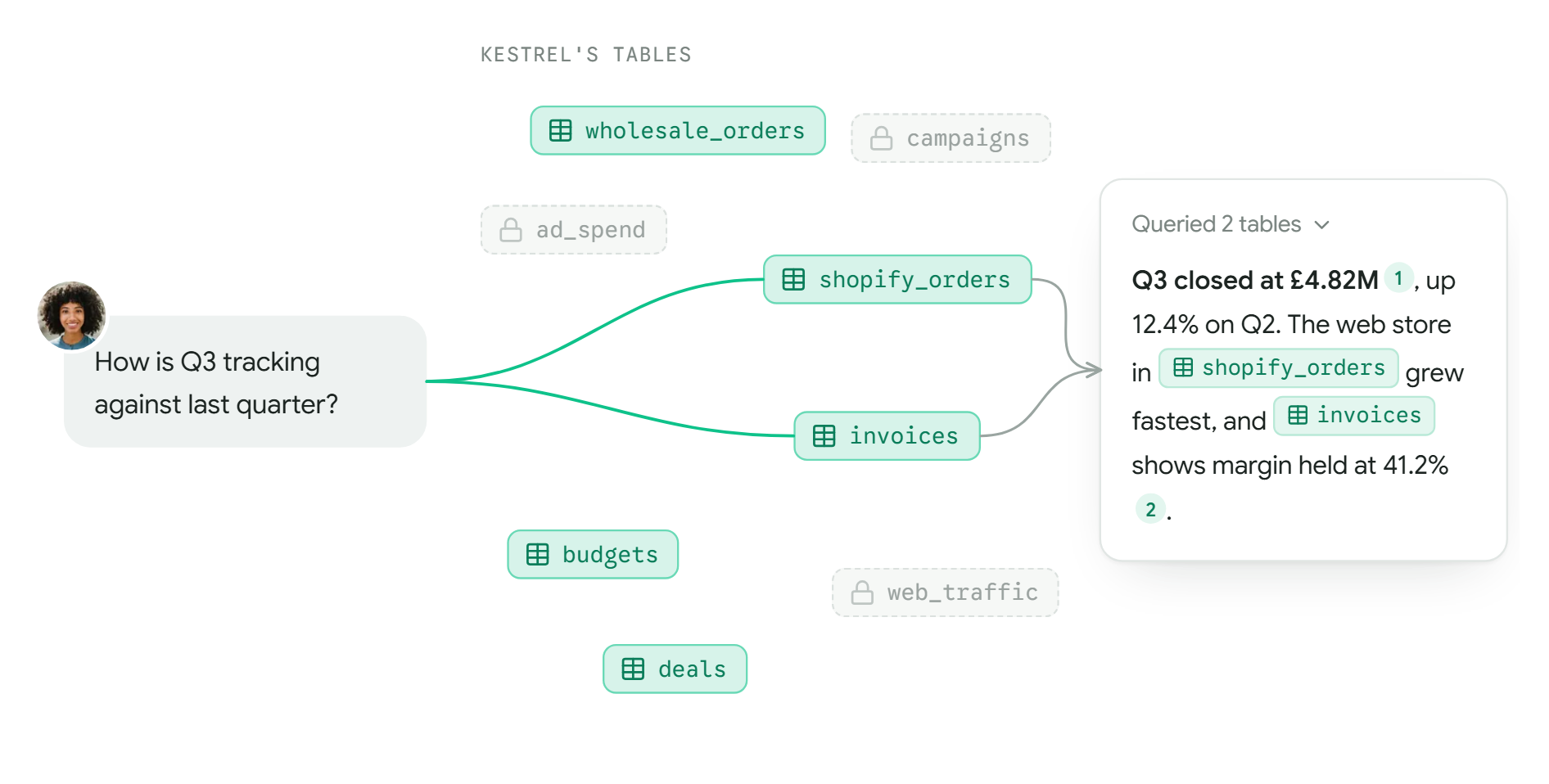
This has two results.
- The same question gets the same answer. Mira does not guess. The same question against the same tables gives the same result, whoever asks and whenever. When a number changes, it is because the data changed.
- Mira says when it doesn't know. If none of your tables hold the answer, Mira tells you so rather than filling the gap.
Reading an answer shows how to check a number. To try it now, go to Your first question.